
Magento 2 store owners across the USA have faced significant disruption due to UPS shipping rates not working following the recent switch to RESTful API protocols and OAuth 2.0 authentication. The top solution is integrating a robust Magento 2 UPS REST API Plugin, especially for merchants relying on UPS Ground services via REST. This guide explains the reasons for the breakdown, all key changes, best troubleshooting practices, and why the Magento 2 UPS REST API Plugin is now essential for e-commerce delivery reliability.
Magento 2 UPS REST API Plugin: Why Is UPS Not Working?
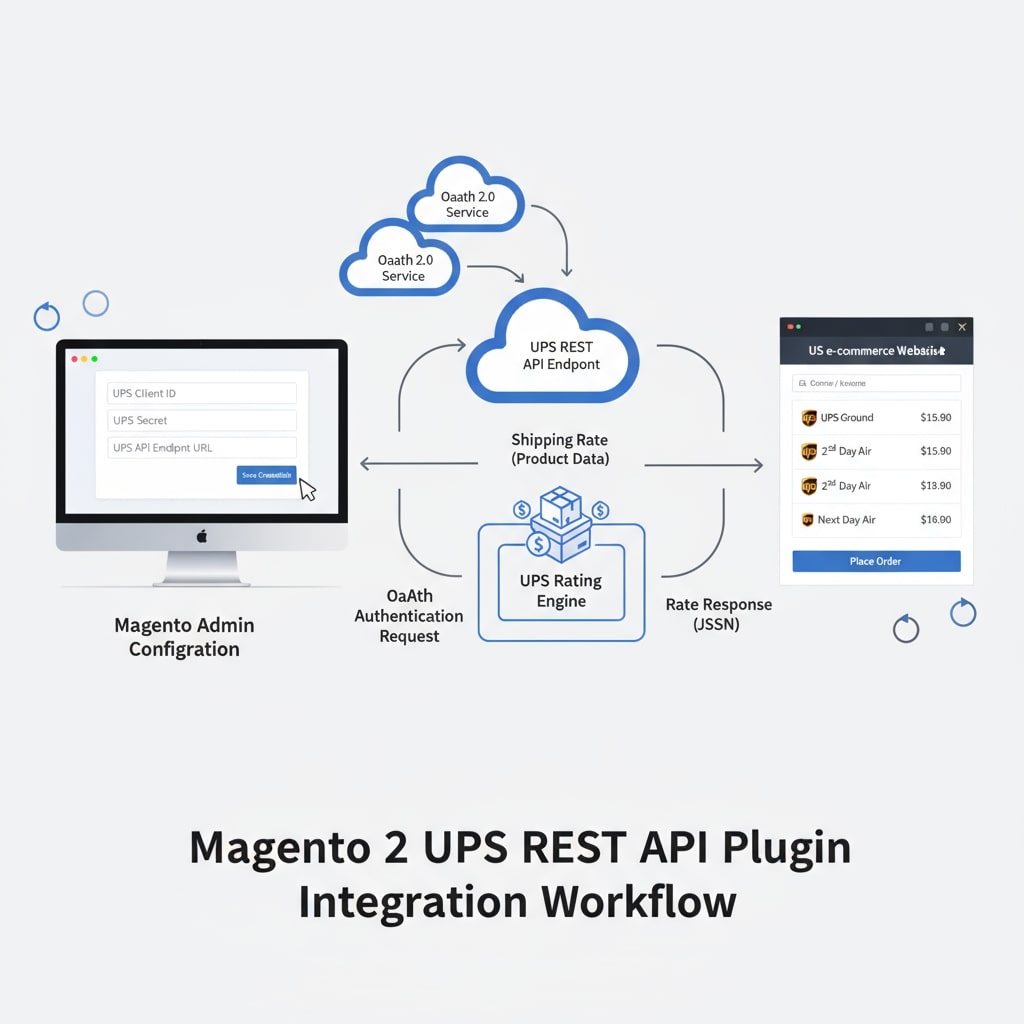
The transition from legacy UPS SOAP/XML APIs to the RESTful protocol using OAuth 2.0 security created integration issues for many Magento 2 users. UPS permanently shut down its older authentication methods in June 2024, which rendered traditional API keys and XML access obsolete for live shipping rate retrieval. The only modern workaround for US Magento 2 merchants is deploying a certified Magento 2 UPS REST API Plugin, such as the one offered on ecomplugins.com.
Critical API Changes That Affect UPS Shipping
Magento 2’s native UPS integration stopped working in many US stores due to several major API changes:
OAuth 2.0 Authentication: UPS now demands OAuth token-based credentials. Users must register their store application on the UPS Developer portal and obtain REST credentials (Client ID and Client Secret).
REST Gateway Endpoints: Merchants are required to use new URLs:
Production:
https://onlinetools.ups.com/api/rating/Sandbox:
https://wwwcie.ups.com/api/rating/.
Mandatory Patch Updates: Adobe Commerce published official patches for Magento versions 2.4.4–2.4.6 to migrate shipping calculation from SOAP to RESTful interface. Without the update, rate calculation fails entirely.
Feature Enhancements: The REST API plugin supports residential/commercial address validation, product-level dimensions, rate customization via markups, free shipping logic, real-time tracking, and custom error handling—all critical for US market standards.
Troubleshooting Magento 2 UPS REST API Plugin Issues
Merchants who experience “UPS not working” scenarios often encounter the following error:
"Invalid Authentication Information."
Common Causes:
Incorrect or outdated UPS credentials.
Using the old API endpoint instead of the new REST URLs.
Missing patch for Magento 2 or misconfigured shipping method settings.
Disabled required subscription APIs on the UPS developer account.
Solution Steps:
Install Adobe’s Official UPS Patch: Update Magento 2 installation to accept RESTful API calls.
Switch UPS Type to REST: From Admin panel:
STORES > Configuration > Sales > Shipping Methods > UPSUpdate Credentials: Enter UPS REST Client ID and Secret into configuration panel.
Verify Gateway URLs: Confirm REST production and sandbox URLs are correctly entered.
Enable Required APIs: In your UPS developer dashboard, approve “Rating” and other subscription APIs.
Test Configuration: Use the ecomplugins.com demo or built-in admin checkout simulation to ensure rate retrieval is active.

Key Additions in Magento 2 UPS REST API Plugin (USA)
Integrating the Magento 2 UPS REST API Plugin offers several new and US market-focused features:
Flexible Residential/Commercial Validation: Auto address checks using UPS API logic, fallback to admin settings if API fails.
Dimension Selection: Product-level entry for height, width, length; supports specialized packaging needs.
Custom Weight Handling: Set minimum/maximum package and order weights, triggering multi-package logic.
Free Shipping Enhancements: Enable free shipping by order subtotal, cart rules, or product attribute.
Advanced Rate Calculations: Add markups (fixed or percentage), hide rates for oversized items, define box styles.
Delivery Estimates and Label Generation: Show estimated delivery window at checkout and create UPS labels from Magento admin.
Discounted Account Rates and Custom Error Messaging: Activate discounted rates for select accounts, inform customers with friendly error messages if rates fail.
API Request Caching: Avoid duplicate calculations for identical shipments, improving efficiency.
Magento 2 UPS REST API Plugin: Configuration Overview
To ensure proper operation and UPS rates at checkout for US stores, follow these steps:
Obtain required REST API keys from UPS.
Update all credentials in the Magento admin shipping configuration.
Choose “United Parcel Service REST” as the UPS Type.
Set dimensions, weights, and rate settings according to your store’s policies.
Test the rates in both sandbox and production environments.
Trending FAQ on Magento 2 UPS REST API Plugin (2025)
Q1: Why does my Magento 2 store show “Invalid Authentication Information” for UPS shipping?
Because UPS now requires OAuth 2.0 authentication for REST API. Make sure the credentials entered—Client ID and Secret—are correct and current, and that the required API subscriptions are enabled in your UPS developer dashboard.
Q2: Where do I find the UPS REST API keys?
Register your store on UPS’s official developer portal, create an app, and retrieve your Client ID and Secret. Avoid using access keys—they are no longer valid after June 2024.
Q3: Can I use my old XML/SOAP UPS module with Magento 2?
No. UPS fully shut down the XML and SOAP APIs in June 2024. Upgrade to a REST API plugin and update Magento to at least version 2.4.4 with the patch.
Q4: What if my Magento 2 UPS REST API Plugin still does not fetch rates?
Double-check the credentials, gateway URLs, enabled APIs, and patch installation. Consider using ecomplugins.com support or Magento developer assistance for USA-based merchants.
Q5: How does the plugin help address over-dimension and multi-package shipments?
The plugin automatically splits orders into packages by defined max weights and dimensions, ensuring UPS rates are accurately calculated for each package and compliant with carrier restrictions.
Why USA Merchants Must Upgrade Now
With the old authentication and rating mechanisms offline, US e-commerce operations risk losing UPS shipping entirely if they do not migrate to a REST API and OAuth 2.0 solution.
The Magento 2 UPS REST API Plugin not only solves the technical obstacles but ensures compliance, greater feature flexibility, optimal delivery tracking, and customer satisfaction.
For more information and a live demo tailored for US merchants, visit ecomplugins.com’s Magento 2 UPS Ground with REST API page.