


In today’s digital era, security is paramount for any e-commerce business. If you run a Magento store, you need specialized protection from increasingly sophisticated threats. EcomPlugins.com offers tailored security extensions designed to protect your website, defend your reputation, and secure customer trust—especially for merchants targeting the USA.
Why Choose EcomPlugins.com for Magento Security?
EcomPlugins.com is a leading provider of Magento extensions trusted by hundreds of online retailers. Our Magento security extension is developed with the unique needs of US-based stores in mind, enabling you to:
Prevent hacking attempts, data breaches, and malware attacks.
Automatically scan, alert, and resolve vulnerabilities.
Ensure PCI DSS and privacy compliance for American merchants.
Protect your revenue and brand reputation.
With a suite of Magento extensions designed to enhance functionality and security, EcomPlugins.com takes the lead in helping your store stay safe in a challenging cyber landscape.
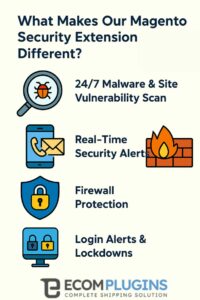
What Makes Our Magento Security Extension Different?
At EcomPlugins.com, our extension includes a robust feature set developed with Magento best practices:
24/7 Malware & Site Vulnerability Scan: The extension continuously monitors your site for malware or suspicious files. Frequent scans ensure early detection to stop threats before damage occurs.
Real-Time Security Alerts: Get instant SMS or email notifications for critical events, so you can react quickly wherever you are.
Firewall Protection: Block suspicious IPs and shield your site from common Magento attacks such as SQL injection, cross-site scripting (XSS), and cross-site request forgery (CSRF).
Two-Factor Authentication (2FA): Add an extra layer of security for both admin and customer account logins to prevent unauthorized access.
Login Alerts & Lockdowns: Thwart brute-force attempts by locking accounts after repeated failed login tries and monitoring unusual login patterns.
File Integrity Checker: Monitor your Magento files for unauthorized changes or modifications and receive alerts on any suspicious activity.
Easy Updates: Stay ahead of hackers with rapid deployment of security fixes—our extension is regularly updated to combat new vulnerabilities.

Our dedicated USA-based support ensures you get quick assistance tailored to your market requirements.
Understanding the Security Risks for Magento Stores
Magento is a powerful e-commerce platform but its popularity and open architecture make it a frequent target for cyber attacks. Let’s dive deeper into the specific risks Magento merchants face:
1. Malware Infections
Malicious software can be injected into Magento stores through insecure plugins, outdated software, or unvalidated input forms. Malware can steal customer data, inject malicious code, or deface your site.
2. Brute Force Attacks
Cybercriminals often use automated scripts to try thousands of username-password combinations to gain admin access, especially if you use weak or default admin usernames or passwords.
3. Data Breaches and Credit Card Skimming
Hackers exploit vulnerabilities to steal sensitive customer and payment information, which can result in legal penalties, loss of consumer trust, and costly remediation.
4. Unpatched Vulnerabilities
Magento periodically releases patches to fix security flaws. Failure to apply these patches promptly leaves your store exposed.
5. Weak Access Controls
Improperly configured user roles or over-privileged admin accounts increase the risk of accidental or intentional misuse.
By using EcomPlugins.com’s security extension, you directly address these threats through automated, consistent protection.
How Does EcomPlugins.com Help US Stores Stay Compliant?
For US merchants, compliance with PCI DSS (Payment Card Industry Data Security Standard), CCPA (California Consumer Privacy Act), and other regulations is mandatory. Our Magento security extension includes features that simplify compliance:
Enforced strong authentication (with 2FA) for admins.
Protection of cardholder data via firewalls and monitoring.
Automated logging and auditing capabilities.
Privacy-centric design to help you respect user data and opt-outs.
Doing business in the USA requires understanding these regulations, and our extension helps you meet those requirements within Magento itself.
Step-by-Step Guide to Installing EcomPlugins.com’s Magento Security Extension
Installing and configuring the extension is straightforward—here’s how US merchants can get started safely and swiftly:
Step 1: Backup Your Magento Store
Before any installation, create a full store backup including files and the database to prevent data loss in case of misconfiguration.
Step 2: Purchase and Download from EcomPlugins.com
Visit our secure Magento Security Extension page at ecomplugins.com and complete your purchase.
Step 3: Upload and Install the Extension
Use Composer or manual upload based on your preference. We also provide a detailed installation guide for clarity.
Step 4: Configure Security Settings
Access the extension’s configuration panel in your Magento admin dashboard. Key recommended settings for US stores include:
Enable 2FA for admin users and optionally for customers.
Set login lockout policies to prevent brute force.
Activate file integrity monitoring.
Restrict admin panel access to US IP addresses if feasible.
Schedule regular automated scans.
Step 5: Conduct an Initial Full Scan
Run the full malware and vulnerability scan to establish a baseline and identify existing threats.
Step 6: Set Up Real-Time Alerts
Configure your preferred contact methods—email, SMS, or in-dashboard notifications—to stay informed of any suspicious activity.
Step 7: Review and Adjust User Roles
Audit all admin and staff users, ensuring minimal necessary privileges, and remove dormant accounts.
Step 8: Keep the Extension and Magento Up to Date
Regular updates close newly-discovered vulnerabilities. Schedule routine checks for updates through your admin dashboard.
Real-World Success Stories Using EcomPlugins.com
Case Study 1: A Leading US Apparel Retailer
This retailer experienced constant brute-force login attempts that threatened their customer data security. After installing our Magento security extension, they enabled 2FA and login lockouts. Within a week, unauthorized logins dropped by over 90%, and they regained full control of their admin access.
Case Study 2: Health & Wellness E-Commerce Store
With frequent security compliance audits, this US health store needed PCI DSS readiness. Our step-by-step configuration aid helped them implement required protections and pass audits without penalties, protecting customer financial information during each transaction.
Frequently Asked Questions
Q: Can I secure my Magento store without an extension if I have secure hosting?
A: While secure hosting is essential, it doesn’t protect Magento-specific vulnerabilities. Our extension addresses Magento-layer risks like admin login control and malware scanning.
Q: Will this extension slow down my store?
A: No. Our extension is performance-optimized. By blocking malicious bot traffic and optimizing processes, many clients report improved load times.
Q: How long does installation take?
A: Installation typically takes under 30 minutes. Comprehensive guides and USA-based support are available to expedite setup.
Q: Can the extension help with GDPR or CCPA compliance?
A: Yes. It includes relevant data privacy features and audit logs that simplify adhering to these regulations, especially for US merchants.
Why EcomPlugins.com Is the Trusted Choice for Magento Security in the USA
Dedicated USA Support: Our team understands local market threats and compliance needs.
Regular Updates: We maintain a rapid update cycle to keep your site defended against emerging threats.
Trusted by Top Magento Stores: Hundreds of US merchants rely on us to protect their business.
Comprehensive Solutions: Beyond security, we offer plugins covering analytics, shipping, and payment enhancements.
Final Thoughts: Don’t Risk Your Store’s Future
Your Magento store is a valuable asset. With growing cybercrime threats and strict compliance rules in the USA, protecting your store isn’t optional—it’s essential. EcomPlugins.com’s Magento Security Extension gives you the features, support, and peace of mind you need to stay secure and compliant.
Ready to secure your Magento store today?
Visit ecomplugins.com to learn more and get started with a reliable security solution tailored for US merchants.